Introduction
In an age where vehicle technology is constantly advancing, understanding your car’s health has become more accessible than ever. Bluetooth OBD2 scanners have emerged as indispensable tools for both professional mechanics and everyday car owners, offering insights into diagnostic trouble codes, live performance data, and maintenance needs directly from your smartphone. Among the crowded market, two names consistently rise to the top for users in the USA seeking reliable and user-friendly options: BlueDriver and FIXD. While both aim to demystify your check engine light, they cater to distinct user needs and offer varying levels of diagnostic depth and feature sets. This comprehensive comparison will dissect BlueDriver and FIXD, helping you determine which scanner aligns best with your specific requirements and automotive expertise.
Comparison Table: BlueDriver vs. FIXD
| Feature | BlueDriver OBD2 Sensor | FIXD OBD2 Sensor |
|---|---|---|
| Primary Focus | Comprehensive diagnostic tool, advanced code reading, professional-grade reports. | User-friendly check engine light explanation, proactive maintenance, simplicity. |
| Price Point (approx.) | Higher initial cost (~$100-120), one-time purchase. | Lower initial cost (~$60-70), optional premium subscription for advanced features. |
| Diagnostic Depth | Extensive. Reads generic (P0) and enhanced (P1, P2, P3, U0, U1, B0, B1, C0, C1) manufacturer-specific codes (ABS, Airbag, TPMS, etc.). | Basic to moderate. Primarily reads generic powertrain codes (P0). Enhanced codes usually require premium subscription. |
| Live Data | Detailed, customizable live data streams with graphing capabilities. Numerous PIDs available. | Basic live data, sufficient for monitoring key parameters, less detail and customization. |
| Repair Reports | Professional-grade, comprehensive repair reports linked to specific codes, including potential causes and verified fixes. | Simpler explanations of codes, general advice, some potential fixes. |
| Maintenance Reminders | Not a primary feature. Focuses on reactive diagnostics. | Core feature. Provides proactive reminders for scheduled maintenance based on mileage/time. |
| Ease of Use | Moderate. Feature-rich app might require a slight learning curve for beginners. | Very easy. Intuitive interface designed for non-technical users. |
| App Interface | Clean, professional, and data-rich. Supports detailed analysis. | Simple, straightforward, focused on actionable insights. |
| Connectivity | Bluetooth (iOS & Android compatible). | Bluetooth (iOS & Android compatible). |
| Target User | DIY enthusiasts, aspiring mechanics, car owners seeking deep insights, those wanting to diagnose and potentially fix problems themselves. | Everyday drivers, those intimidated by car issues, individuals primarily seeking check engine light definitions and maintenance alerts. |
BlueDriver OBD2 Sensor: Overview
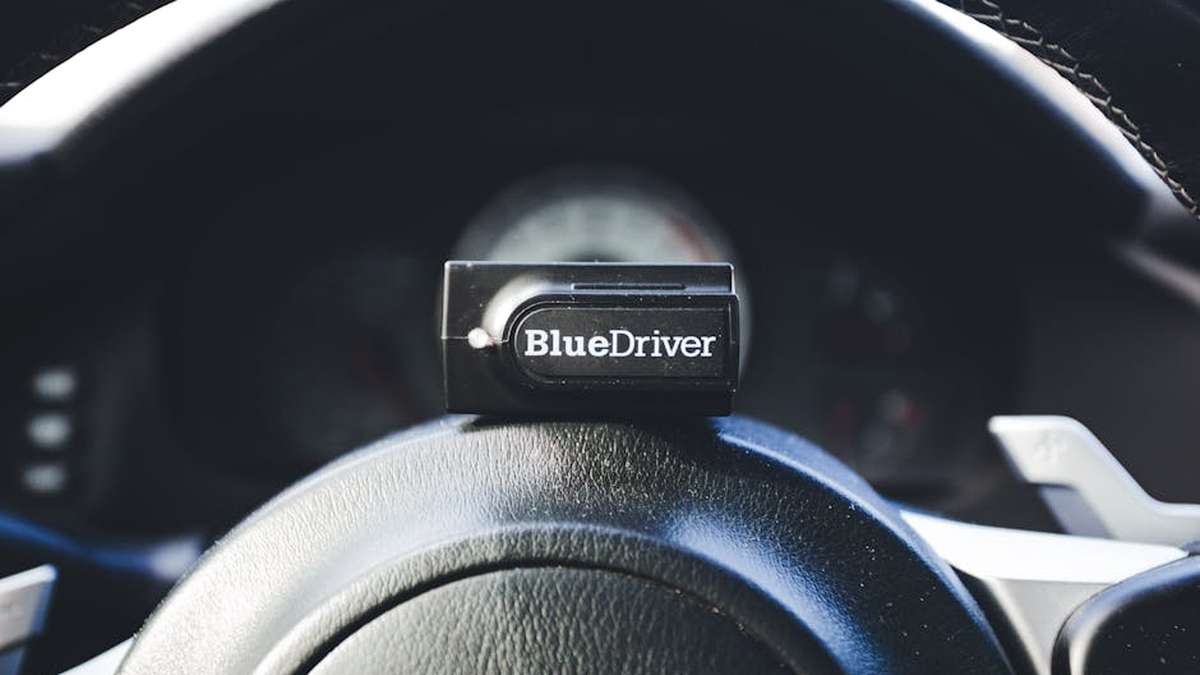
The BlueDriver OBD2 Sensor, developed by Lemur Vehicle Monitors, has garnered a reputation as a professional-grade diagnostic tool made accessible to consumers. It stands out for its comprehensive scanning capabilities, extending beyond basic generic powertrain codes to include enhanced manufacturer-specific codes for systems like ABS, airbags, TPMS, and more. This level of detail empowers users to pinpoint issues that simpler scanners often miss. The accompanying BlueDriver app is robust, offering detailed live data graphing, freeze frame data, smog check readiness tests, and its standout feature: proprietary Repair Reports, which provide verified fixes specific to your vehicle’s make, model, and diagnostic trouble codes. It’s a one-time purchase, providing full access to all its features without recurring subscriptions.
FIXD OBD2 Sensor: Overview
FIXD positions itself as the ultimate co-pilot for your car, emphasizing simplicity and proactive vehicle health monitoring. Its primary appeal lies in translating complex check engine light codes into plain English, making vehicle diagnostics approachable for anyone, regardless of mechanical knowledge. Beyond error codes, FIXD excels in providing maintenance reminders tailored to your vehicle’s specific make and model, helping users stay on top of scheduled service. While the initial sensor cost is lower, FIXD offers a “Premium” subscription service that unlocks advanced features like emission pre-check, enhanced code reading (similar to BlueDriver, but paywalled), direct access to a mechanic hotline, and estimated repair costs. It’s designed for the everyday driver who wants peace of mind and simplified car care. Related: Anker PowerDrive Speed+ 2 Car Charger Review: Rapid Charging for All Your USA Road Trip Devices?
Feature Comparison
Diagnostic Trouble Codes (DTCs)
- BlueDriver: Excels here with its ability to read not only generic (P0) codes but also enhanced (P1-P3, B0-B3, C0-C3, U0-U3) manufacturer-specific codes. This means it can diagnose issues with anti-lock brakes (ABS), airbags (SRS), transmission, and other non-powertrain systems. This comprehensive scanning capability is a major differentiator.
- FIXD: Primarily focuses on generic powertrain (P0) codes in its free version. While it provides clear, plain-English explanations for these codes, accessing enhanced codes for systems like ABS or airbags typically requires a FIXD Premium subscription, placing it behind BlueDriver’s standard offering in terms of out-of-the-box diagnostic depth.
Live Data & Performance Monitoring
- BlueDriver: Offers extensive live data parameters (PIDs) that can be viewed in real-time, graphed, and customized. Users can monitor various engine sensors, oxygen sensor readings, fuel trim, and more, providing deep insights into engine performance and aiding in advanced troubleshooting.
- FIXD: Provides basic live data monitoring for essential parameters. While it allows users to see critical engine performance metrics, it lacks the depth, customization, and advanced graphing capabilities found in BlueDriver, making it less suitable for detailed performance analysis or complex diagnostics.
Repair Reports & Solutions
- BlueDriver: Its proprietary Repair Reports are a significant strength. After scanning, BlueDriver generates comprehensive reports that link specific DTCs to potential causes and verified fixes, sourced from a vast database of professional technician experience. This empowers users to understand the problem and often attempt repairs themselves or have informed discussions with mechanics.
- FIXD: Offers explanations of DTCs in simple terms and often provides general suggestions for addressing the issue. While helpful for understanding, its reports are less detailed and solution-oriented compared to BlueDriver’s, focusing more on identification rather than specific repair guidance. FIXD Premium offers a mechanic hotline for more personalized advice.
Maintenance Reminders & Vehicle Health
- BlueDriver: Its primary focus is on reactive diagnostics – telling you what’s wrong when an issue arises. It doesn’t inherently offer proactive maintenance reminders based on mileage or time.
- FIXD: This is where FIXD truly shines for the everyday driver. It provides personalized maintenance reminders based on your vehicle’s make, model, and mileage, helping you stay on top of oil changes, tire rotations, and other scheduled services. This proactive approach is a key value proposition.
User Interface & Ease of Use
- BlueDriver: The app interface is clean and professional but can be feature-dense. While intuitive for those familiar with automotive terms, it might present a slight learning curve for absolute beginners due to the sheer volume of data and options.
- FIXD: Designed with simplicity in mind, the FIXD app is exceptionally user-friendly. Its interface is clean, uncluttered, and focuses on delivering information in an easily digestible format, making it ideal for those new to car diagnostics.
BlueDriver Pros and Cons
Pros:
- Reads enhanced manufacturer-specific codes (ABS, Airbag, TPMS, etc.) for deeper diagnostics.
- Provides comprehensive, professional-grade Repair Reports with verified fixes.
- Offers detailed and customizable live data graphing for advanced analysis.
- One-time purchase; no subscription required for full functionality.
- Excellent for DIY mechanics and car enthusiasts seeking in-depth vehicle insights.
Cons:
- Higher initial cost compared to FIXD.
- Can be overwhelming for users with no prior diagnostic experience due to feature richness.
- Does not offer proactive maintenance reminders as a core feature.
FIXD Pros and Cons
Pros:
- Extremely easy to use, translating complex codes into plain English.
- Provides proactive maintenance reminders to help manage vehicle upkeep.
- Lower initial cost for the sensor.
- Valuable for everyday drivers who prioritize simplicity and basic information.
- Optional FIXD Premium adds enhanced features and mechanic hotline access.
Cons:
- Limited diagnostic depth in the free version (primarily generic codes).
- Many advanced features (enhanced codes, pre-check, mechanic hotline) require a paid subscription.
- Less detailed live data and graphing capabilities compared to BlueDriver.
- Not suitable for professional diagnostics or in-depth troubleshooting without Premium subscription.
Which One Is Better For Whom?
Who Should Choose BlueDriver?
- DIY Enthusiasts: If you enjoy working on your car, want to understand the root cause of issues, and potentially perform repairs yourself, BlueDriver’s in-depth diagnostics and repair reports are invaluable.
- Aspiring Mechanics: For those learning about automotive diagnostics, BlueDriver offers a rich data set and comprehensive code explanations that can aid in the learning process.
- Owners of Specific Vehicle Makes: If your vehicle frequently triggers non-powertrain codes (e.g., ABS, SRS), BlueDriver’s ability to read enhanced manufacturer codes will be crucial.
- Budget-Conscious Long-Term: While the initial cost is higher, the lack of a subscription means its overall cost of ownership can be lower over time for full functionality.
Who Should Choose FIXD?
- Everyday Drivers & Beginners: If you simply want to know what your check engine light means in clear terms and when your car needs routine maintenance, FIXD is perfect.
- Those Intimidated by Car Maintenance: FIXD simplifies car care, making it less daunting to understand and manage your vehicle’s health.
- Individuals Seeking Proactive Maintenance: If staying on top of oil changes, tire rotations, and other scheduled services is a priority, FIXD’s reminder system is a major asset.
- Value Seekers (Initial Purchase): For those looking for the lowest upfront cost to get basic diagnostic capabilities.
Final Verdict
The choice between BlueDriver and FIXD ultimately boils down to your personal needs, technical comfort level, and the depth of automotive insight you require. Related: AUTO-VOX D7 Dash Cam Mirror Review: The Dual-View Upgrade Every USA Driver Needs?
- Choose BlueDriver if you are a DIY mechanic, a serious car enthusiast, or someone who desires professional-grade diagnostic capabilities, in-depth repair guidance, and comprehensive live data graphing without recurring fees. It’s an investment in understanding your vehicle at a deep level.
- Choose FIXD if you are an everyday driver looking for simplicity, clear explanations of your check engine light, proactive maintenance reminders, and peace of mind without getting bogged down in technical details. Its user-friendly interface makes car care approachable, though advanced features typically require a subscription.
Both devices serve excellent purposes within their respective niches. By evaluating your automotive diagnostic needs against their unique strengths, you can confidently select the Bluetooth OBD2 scanner that will best serve you and your vehicle. Related: TSY 24Ghz Blind Spot Monitor Review: An Aftermarket Safety Upgrade for Your American Vehicle?
Related: NOCO Boost Plus GB40 vs. BUTURE BR700: The Ultimate Portable Jump Starter Showdown for Your Car
Which scanner offers more in-depth diagnostic information and advanced features for a serious DIYer?
For serious DIY mechanics, BlueDriver is generally preferred. It excels in providing comprehensive diagnostic information, including access to advanced vehicle systems like ABS, Airbag, Transmission, and TPMS. It also offers live data graphing, freeze frame data, and detailed repair reports with potential fixes, going far beyond basic check engine light explanations that FIXD primarily focuses on.
Considering the subscription model of FIXD versus BlueDriver’s one-time purchase, which offers better long-term value?
BlueDriver typically offers better long-term value as it’s a one-time purchase that unlocks all its powerful features, including advanced diagnostics and repair reports, without any recurring fees. FIXD offers basic features for free but requires a monthly or annual subscription to access its more comprehensive diagnostic tools, maintenance schedules, and predicted failure reports, which can become costly over time.
For someone primarily interested in pre-purchase inspections or monitoring overall vehicle health, which device is more suitable?
BlueDriver is significantly more suitable for pre-purchase inspections and comprehensive vehicle health monitoring. Its ability to access and interpret codes from various vehicle modules (not just the engine) gives a much clearer picture of a car’s overall condition. While FIXD can monitor basic engine health, its limited system access means it might miss crucial issues that BlueDriver would detect.
Which Bluetooth OBD2 scanner, BlueDriver or FIXD, is easier for a novice to set up and use with both iPhone and Android devices?
Both BlueDriver and FIXD are designed to be user-friendly with intuitive apps for both iPhone and Android. FIXD often gets the slight edge for absolute novices due to its extremely simplified interface that prioritizes plain-language explanations of problems. BlueDriver is also very straightforward to set up and use, but offers more features that might present a slightly steeper initial learning curve for someone with no prior diagnostic experience, though it remains highly accessible.
Related Products
- THISWORX Car Vacuum vs. Homasy Portable Car Vacuum: Which is the Top Cordless Cleaner for Your Vehicle?
- Chemical Guys HydroSlick vs. Meguiar’s Hybrid Ceramic Wax: The Ultimate Paint Protection Battle
- ANCEL AD310 vs. FOXWELL NT301: Which OBD2 Scanner Offers More for DIY Car Maintenance?
- NOCO Boost Plus GB40 vs. BUTURE BR700: The Ultimate Portable Jump Starter Showdown for Your Car
- AUTO-VOX D7 Dash Cam Mirror Review: The Dual-View Upgrade Every USA Driver Needs?