





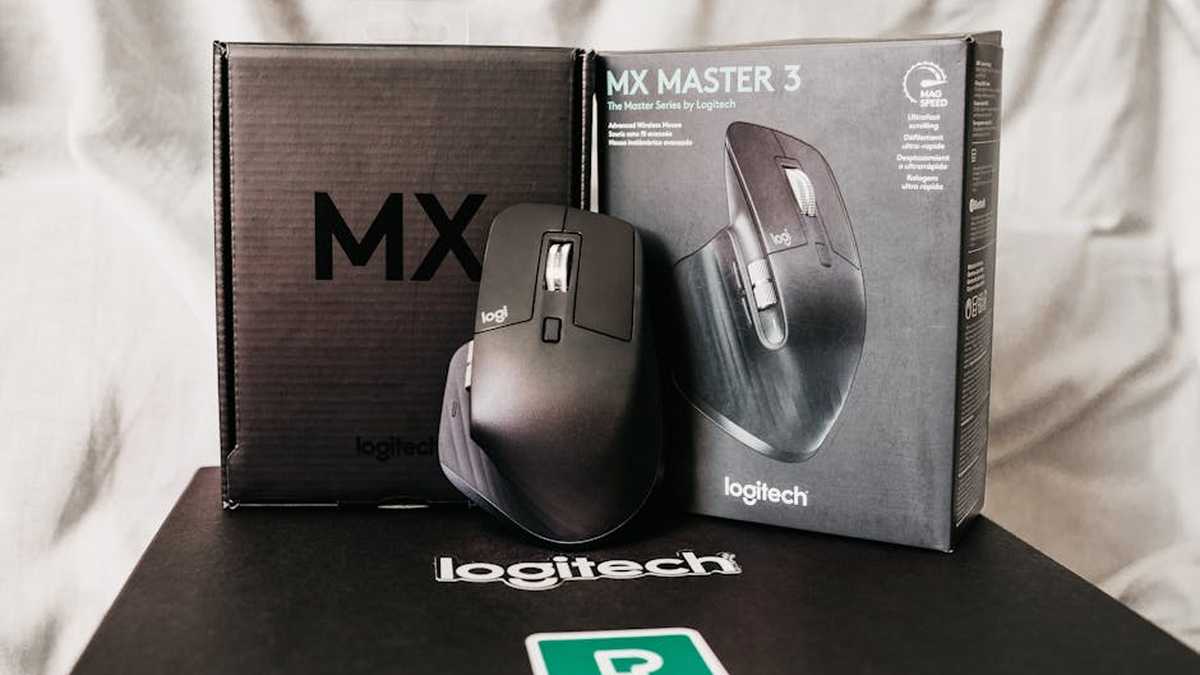
Introduction
In the demanding landscape of modern American workplaces, where efficiency and comfort directly impact output, the tools we choose are paramount. The Logitech MX Master 3S has solidified its position as a go-to peripheral for professionals seeking to optimize their workflow and mitigate the strain of long hours at the desk. This review delves into why this advanced ergonomic mouse is frequently cited as a leader in its category, examining its capabilities, design philosophy, and ultimate impact on productivity for discerning users across the United States.
Product Overview
The Logitech MX Master 3S is the latest iteration in Logitech’s acclaimed MX Master series, a line synonymous with premium productivity mice. Engineered for power users, designers, developers, and office professionals, it presents a meticulously sculpted design intended to cradle the hand, promoting a natural wrist posture. More than just an ergonomic shape, the MX Master 3S integrates cutting-edge technology such as its signature MagSpeed Electromagnetic Scrolling and an 8K DPI Darkfield sensor, ensuring unparalleled precision and versatility. It is designed not merely as an input device, but as an extension of the user’s intent, translating every gesture into efficient digital action.
Key Features
- Ergonomic Design: The mouse features a distinctive, hand-sculpted shape designed to support the palm and wrist, reducing muscle strain and promoting a more comfortable grip during extended use.
- MagSpeed Electromagnetic Scrolling: This revolutionary scroll wheel can switch between precise, ratcheted scrolling and incredibly fast, free-spinning scrolling that can fly through thousands of lines in seconds, all with electromagnetic precision and near-silent operation.
- 8K DPI Darkfield Tracking: Equipped with an 8,000 DPI sensor, the MX Master 3S offers exceptional precision, allowing it to track on virtually any surface, including glass (at least 4mm thick), making a mouse pad optional for many setups.
- Quiet Click Buttons: A significant upgrade, the primary click buttons are now up to 90% quieter than its predecessor, the MX Master 3, contributing to a more focused work environment without sacrificing tactile feedback.
- USB-C Fast Charging & Long Battery Life: A single full charge via USB-C can power the mouse for up to 70 days. A quick 1-minute charge can provide up to 3 hours of use, ensuring minimal downtime.
- Multi-Device Connectivity: Connects to up to three devices via Bluetooth Low Energy or the included Logi Bolt USB receiver. The Easy-Switch button allows seamless toggling between connected computers.
- Logi Options+ Customization: Unlock the full potential with the Logi Options+ software. Users can customize virtually every button, set application-specific profiles, adjust pointer speed, and more, tailoring the mouse to their specific workflow.
- Flow Cross-Computer Control: With Logitech Flow, users can seamlessly control multiple computers (Windows or macOS) with a single MX Master 3S, moving the cursor across screens and even copying/pasting text, images, and files between systems.
Pros and Cons
Pros
- Superior Ergonomics: The sculpted design offers exceptional comfort for most right-handed users, alleviating fatigue over long work sessions.
- Unparalleled Scrolling: The MagSpeed scroll wheel is a game-changer for navigating documents and web pages efficiently.
- Exceptional Tracking: 8K DPI Darkfield sensor provides precise control on nearly any surface.
- Whisper-Quiet Clicks: A welcome improvement, contributing to a less distracting workspace.
- Robust Customization: Logi Options+ allows for deep personalization, adapting the mouse to diverse professional tasks.
- Multi-Device & Multi-OS Support: Seamlessly works across multiple computers and operating systems.
- Premium Build Quality: Durable construction and high-quality materials justify its professional-grade status.
- Long-Lasting Battery: Excellent battery life with convenient USB-C fast charging.
Cons
- Premium Price Point: Positioned at the higher end of the market, which might be a barrier for budget-conscious buyers.
- Right-Handed Only: The ergonomic design is specific to right-handed users, excluding left-handed individuals.
- Size and Weight: Its relatively large size and heft may not be ideal for users with smaller hands or those preferring ultra-light mice.
- Not for Competitive Gaming: While precise, it’s not designed for the high refresh rates and ultra-low latency demanded by professional esports.
- No Dongle Storage: Unlike some portable Logitech mice, there is no built-in storage compartment for the Logi Bolt USB receiver.
Who Should Buy This
- Office Professionals and Power Users: Individuals who spend extensive hours at their computer and demand a comfortable, feature-rich mouse for daily tasks.
- Content Creators & Designers: The precision, customizable buttons, and seamless scrolling are highly beneficial for graphic design, video editing, and CAD work.
- Software Developers: Efficient code navigation and multi-application control are enhanced by the MX Master 3S’s capabilities.
- Multi-Computer Users: Those working across several devices or operating systems will greatly benefit from Flow technology and easy-switch functionality.
- Anyone Prioritizing Ergonomics: If wrist strain or discomfort is a concern, the MX Master 3S offers a well-regarded ergonomic solution.
Who Should Avoid This
- Budget-Conscious Consumers: If cost is the primary factor, more basic and affordable mice are available, albeit with fewer advanced features.
- Competitive Gamers: While capable, it’s not optimized for the specific demands of high-performance gaming where lighter weight and specific sensor types are preferred.
- Left-Handed Users: The design is exclusively for right-handed use.
- Users with Very Small Hands: The generous dimensions might make it uncomfortable for those with particularly small hands.
- Minimalists: Individuals who prefer simple, no-frills input devices may find its feature set overkill.
Pricing Insight
The Logitech MX Master 3S typically retails at a premium price point, reflecting its advanced technology, superior build quality, and comprehensive feature set. While it represents a significant investment compared to standard office mice, it should be viewed as a long-term asset that can substantially enhance daily productivity and comfort. Prospective buyers are advised to monitor major retailers and Logitech’s official channels for occasional sales or bundle offers, which can make the purchase more accessible. Considering its durability and the potential gains in workflow efficiency and reduced physical strain, the cost can be justified as an investment in professional well-being and output. Related: VariDesk Pro Plus 36 vs. FlexiSpot M3B Standing Desk Converters: Which Ergonomic Riser Offers Best Value for US Home Offices?
Comparison with 1 Alternative: Logitech MX Vertical
While the MX Master 3S excels in traditional ergonomic comfort and feature richness, an interesting alternative for users prioritizing a different approach to ergonomics is the Logitech MX Vertical. Related: Best Ergonomic Office Chairs in USA (2026)
- Logitech MX Master 3S:
- Ergonomics: Traditional horizontal hand rest, sculpted for a natural relaxed palm position.
- Features: MagSpeed scroll wheel, thumb wheel, extensive programmable buttons, Flow, 8K DPI.
- Use Case: Power users, productivity enthusiasts, anyone accustomed to a standard mouse form factor but seeking premium comfort and features.
- Logitech MX Vertical:
- Ergonomics: Vertical “handshake” grip, designed to reduce forearm pronation and wrist pressure by keeping the hand in a more natural, upright position. Requires adaptation for many users.
- Features: Standard scroll wheel, fewer programmable buttons than the MX Master 3S, Flow, 4000 DPI.
- Use Case: Users specifically experiencing wrist pain or seeking to proactively prevent it, those willing to adapt to a new grip style for specific ergonomic benefits.
The choice between the two largely hinges on ergonomic preference. The MX Master 3S offers a familiar yet optimized ergonomic shape with a broader feature set for productivity. The MX Vertical, on the other hand, makes a more radical departure in form factor, aiming directly at reducing wrist pronation, which some users find more beneficial for their specific comfort needs, though it trades some of the MX Master 3S’s advanced controls. Related: My Honest Rocketbook Core Review: The Last Notebook You’ll Ever Buy for WFH & Hybrid Office?
Final Verdict
The Logitech MX Master 3S stands as a formidable contender in the premium productivity mouse segment, offering a compelling blend of advanced features, meticulous ergonomic design, and robust customization. For professionals in America and beyond who demand precision, efficiency, and comfort from their peripheral devices, the MX Master 3S delivers on its promise. Its MagSpeed scrolling and 8K DPI tracking provide an undeniable edge in navigation and accuracy, while the quiet clicks and extensive customization via Logi Options+ refine the user experience. While its price point places it firmly in the premium category and its design is exclusively for right-handed users, the investment is demonstrably justified by the significant boost in productivity and reduction in physical strain it offers. For any user looking to elevate their desktop experience and enhance their professional output, the MX Master 3S represents a wise and impactful choice. Related: Best Smart Modular Ergonomic Desk Solutions for Ultimate Productivity in USA (2026)