





Introduction
In today’s fast-paced digital landscape, where screen time often stretches into double-digit hours, the tools we use directly impact our productivity and, crucially, our physical well-being. An uncomfortable mouse can lead to fatigue, wrist strain, and a significant drop in efficiency. Enter the Logitech MX Master 3S, a device positioned as the ultimate precision instrument for power users. But does it truly live up to the hype? This data-driven review dives deep into its features, performance, and overall value to help you determine if this ergonomic powerhouse is the upgrade your 2024 productivity goals demand.
Product Overview
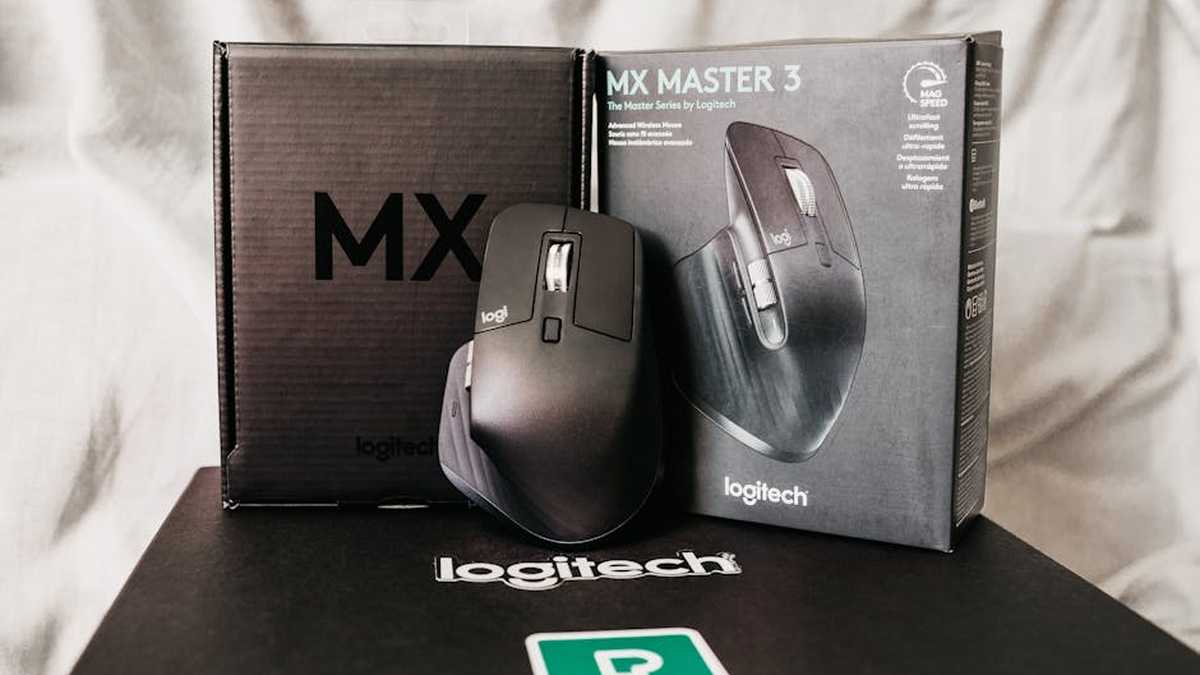
The Logitech MX Master 3S is the latest iteration in Logitech’s highly acclaimed MX Master series, a line synonymous with premium productivity mice. Designed specifically for creative professionals, developers, data analysts, and anyone spending extended periods at a computer, it combines advanced ergonomics with state-of-the-art technology. It’s a full-sized, sculpted wireless mouse crafted to cradle the hand, featuring a distinct thumb rest and an array of customizable buttons. Connectivity is handled via Logitech’s secure Logi Bolt USB receiver or Bluetooth, offering versatile pairing options for up to three devices.
Key Features
- Ergonomic Design: Meticulously sculpted for the right hand, featuring a prominent thumb rest and a natural palm curve to reduce wrist and forearm strain during prolonged use.
- 8K DPI Darkfield Optical Sensor: Boasts an impressive 8000 DPI sensor, allowing for ultra-precise tracking on virtually any surface, including glass, a significant upgrade from previous models.
- Quiet Click Technology: Engineered to provide 90% less click noise compared to the MX Master 3, creating a more focused and less disruptive work environment.
- MagSpeed Electromagnetic Scrolling: The iconic scroll wheel allows for incredibly fast (up to 1,000 lines per second) and precise scrolling, with a seamless transition between ratcheted and free-spin modes. A second thumb wheel enables horizontal scrolling.
- Flow Cross-Computer Control: Utilize Logitech Flow to seamlessly control multiple computers (Windows and macOS) by simply moving your cursor to the edge of the screen, even allowing for file and text transfer between devices.
- Customizable Buttons & Gestures: With Logitech Options+ software, users can customize the six buttons and gesture controls for specific applications, enhancing workflow efficiency significantly.
- USB-C Fast Charging & Long Battery Life: Offers up to 70 days of power on a full charge. A quick 1-minute charge provides up to 3 hours of use, making downtime almost nonexistent.
- Logi Bolt & Bluetooth Connectivity: Provides dual connectivity options, ensuring a stable and secure connection across a variety of devices and operating systems.
Pros and Cons
Pros
- Superior Ergonomics: Unmatched comfort for right-handed users, significantly reducing fatigue during long sessions.
- Exceptional Precision: 8K DPI sensor tracks flawlessly on almost any surface, crucial for detailed work.
- Whisper-Quiet Clicks: A game-changer for shared workspaces or simply a more peaceful personal environment.
- Versatile MagSpeed Scroll Wheel: Boosts productivity with its speed, precision, and silent operation.
- Seamless Multi-Device Workflow: Logitech Flow is incredibly efficient for users with multiple computers.
- Extensive Customization: Tailor buttons and gestures for application-specific shortcuts.
- Excellent Battery Life & USB-C: Reliable power and modern, fast charging capabilities.
- Premium Build Quality: Durable construction with a high-quality feel.
Cons
- Not for Left-Handed Users: The ergonomic design is exclusively for right-handers.
- Premium Price Point: Positioned at the higher end of the mouse market, which might be a barrier for some.
- Can Be Bulky: Its larger size might not be ideal for users with very small hands or for frequent travel.
- Software Dependency for Full Features: Logitech Options+ is required to unlock its full customization potential.
- Not a Gaming Mouse: While precise, its weight and design are optimized for productivity, not competitive gaming.
Who Should Buy This
- Productivity Professionals: Designers, developers, editors, data scientists, and office workers who spend long hours in front of a computer.
- Users Prioritizing Ergonomics: Anyone seeking to alleviate or prevent wrist strain and improve comfort during extended use.
- Multi-Device Power Users: Individuals who frequently switch between two or three computers (e.g., desktop and laptop, Windows and Mac).
- Detail-Oriented Workers: Professionals who require exceptional precision and control for tasks like graphic design or spreadsheet manipulation.
- Quiet Environment Seekers: Those who appreciate or require a silent clicking experience to minimize distractions.
- Premium Hardware Enthusiasts: Individuals willing to invest in top-tier peripherals for an enhanced computing experience.
Who Should Avoid This
- Left-Handed Individuals: The sculpted design is strictly for right-hand use.
- Budget-Conscious Consumers: If you’re looking for an affordable basic mouse, the MX Master 3S will likely exceed your budget.
- Hardcore Gamers: While precise, its weight and feature set are not optimized for fast-paced competitive gaming.
- Users with Very Small Hands: The generous size of the MX Master 3S might prove uncomfortable for smaller hands.
- Minimalists: If you prefer a simple, compact mouse without advanced features, this might be overkill.
Pricing Insight
The Logitech MX Master 3S typically retails at a premium price, usually around the $99-$109 mark in the USA. While this might seem substantial for a computer mouse, it’s important to view it as an investment in productivity, comfort, and long-term health. Considering its robust feature set, durable build, and the potential to mitigate repetitive strain injuries, the cost can be justified for its target audience. Periodic sales and discounts from major retailers can sometimes bring the price down, so keeping an eye out for these opportunities can offer additional value. For professionals, the productivity gains and ergonomic benefits often outweigh the initial expenditure over the lifespan of the device. Related: Best Smart Modular Ergonomic Desk Solutions for Ultimate Productivity in USA (2026)
Comparison with Alternative: Logitech MX Master 3
The MX Master 3S is an iterative update to the already excellent Logitech MX Master 3. Here’s how they stack up: Related: My Honest Rocketbook Core Review: The Last Notebook You’ll Ever Buy for WFH & Hybrid Office?
- Sensor Precision: The MX Master 3S features an 8K DPI Darkfield sensor, doubling the 4K DPI of the MX Master 3. This translates to even finer control and responsiveness, particularly useful on high-resolution monitors.
- Click Noise: This is a significant differentiator. The MX Master 3S incorporates Quiet Click technology, making button presses noticeably quieter (around 90% less noise). The MX Master 3, while not excessively loud, has audible clicks that some users found disruptive.
- Connectivity: The MX Master 3S ships with the newer, more secure Logi Bolt USB receiver, offering enhanced enterprise-level security and a robust connection. The MX Master 3 utilizes the Unifying receiver. Both also support Bluetooth.
- Ergonomics & Design: The core ergonomic shape and design are largely identical, offering the same renowned comfort. Both feature the MagSpeed scroll wheel and thumb wheel.
- Battery Life & Charging: Both models offer similar excellent battery life (up to 70 days) and convenient USB-C fast charging.
Verdict: If budget is a primary concern, the MX Master 3 remains a phenomenal mouse and often available at a lower price. However, if you prioritize maximum precision, a truly silent clicking experience, and the enhanced security of Logi Bolt, the MX Master 3S justifies its slightly higher cost as the superior, albeit incremental, upgrade. Related: Logitech MX Master 3S Review: Why America’s #1 Ergonomic Mouse Boosts Office Productivity
Final Verdict
After a comprehensive evaluation, the Logitech MX Master 3S undeniably stands out as a top-tier ergonomic mouse designed for the modern professional. Its blend of exceptional comfort, pinpoint precision with the 8K DPI sensor, revolutionary MagSpeed scrolling, and the peace of mind offered by quiet clicks creates a compelling user experience. For those who spend significant time interacting with a computer, this device is more than just a peripheral; it’s a productivity enhancer and a proactive step towards better ergonomic health. Related: VariDesk Pro Plus 36 vs. FlexiSpot M3B Standing Desk Converters: Which Ergonomic Riser Offers Best Value for US Home Offices?
While its premium price and right-handed-only design are considerations, the value derived from reduced strain, increased efficiency through customization, and seamless multi-device control positions it as a worthwhile investment. If your 2024 productivity goals involve longer, more comfortable, and more efficient work sessions, the Logitech MX Master 3S is indeed a strong candidate for that “must-have” title. It is highly recommended for its target demographic, offering a refined, feature-rich experience that genuinely impacts daily workflow. Related: DeskGenius Smart Modular Organizer Review: Conquering Clutter for US Hybrid Workers (Worth The Upgrade?)