





Introduction: The Quest for Ultimate Ergonomics in the USA Office
In the bustling landscape of the modern American office, where countless hours are spent at a desk, the choice of peripheral equipment significantly impacts productivity, comfort, and long-term health. Among these, the mouse stands as a critical interface. Logitech, a venerable name in computing accessories, offers two standout ergonomic options for the discerning professional: the MX Master 3S and the MX Vertical. Both aim to enhance the user experience, but they approach the challenge of ergonomics and productivity from fundamentally different design philosophies. This deep dive will dissect their features, analyze their strengths and weaknesses, and ultimately help USA office workers determine which device truly reigns supreme for their specific needs this season.
Comparison Table: MX Master 3S vs. MX Vertical
| Feature | Logitech MX Master 3S | Logitech MX Vertical |
|---|---|---|
| Ergonomic Design | Contoured, hand-sculpted shape with thumb rest. Emphasizes natural hand position and support for prolonged use. | Vertical “handshake” grip (57-degree angle). Reduces forearm pronation and wrist pressure. |
| Target User Focus | Power users, creatives, multi-device users needing precision, speed, and advanced features. | Users seeking to reduce wrist strain, prevent RSI, or manage existing discomfort; general ergonomic awareness. |
| Connectivity | Logi Bolt USB Receiver, Bluetooth Low Energy. | Logi Bolt USB Receiver, Bluetooth Low Energy, USB-C Charging Cable (also for wired use). |
| Sensor Technology | Darkfield High Precision (200-8000 DPI, adjustable in 50 DPI increments). Tracks on virtually any surface. | High Precision Optical (400-4000 DPI, adjustable in 50 DPI increments). Tracks on most surfaces. |
| Scroll Wheels | MagSpeed Electromagnetic scroll wheel (1000 lines/sec) + Thumb scroll wheel (horizontal scrolling). | Precision scroll wheel. |
| Programmable Buttons | 7 buttons (Left/Right click, Back/Forward, App-Switch, Wheel mode-shift, Thumb wheel click, Gesture button). | 4 buttons (Left/Right click, Back/Forward, DPI switch button). |
| Battery Life | Up to 70 days on a full charge. 3 hours of use from 1 minute charge. | Up to 4 months on a full charge. |
| Charging Port | USB-C | USB-C |
| Multi-Device Support | Logitech Flow (seamless control across up to 3 computers), Easy-Switch button. | Easy-Switch button for up to 3 devices. |
| Software Compatibility | Logi Options+ (Windows, macOS) | Logi Options+ (Windows, macOS) |
| Approx. USA Price (MSRP) | $99.99 | $69.99 |
Logitech MX Master 3S Overview: The Power User’s Command Center
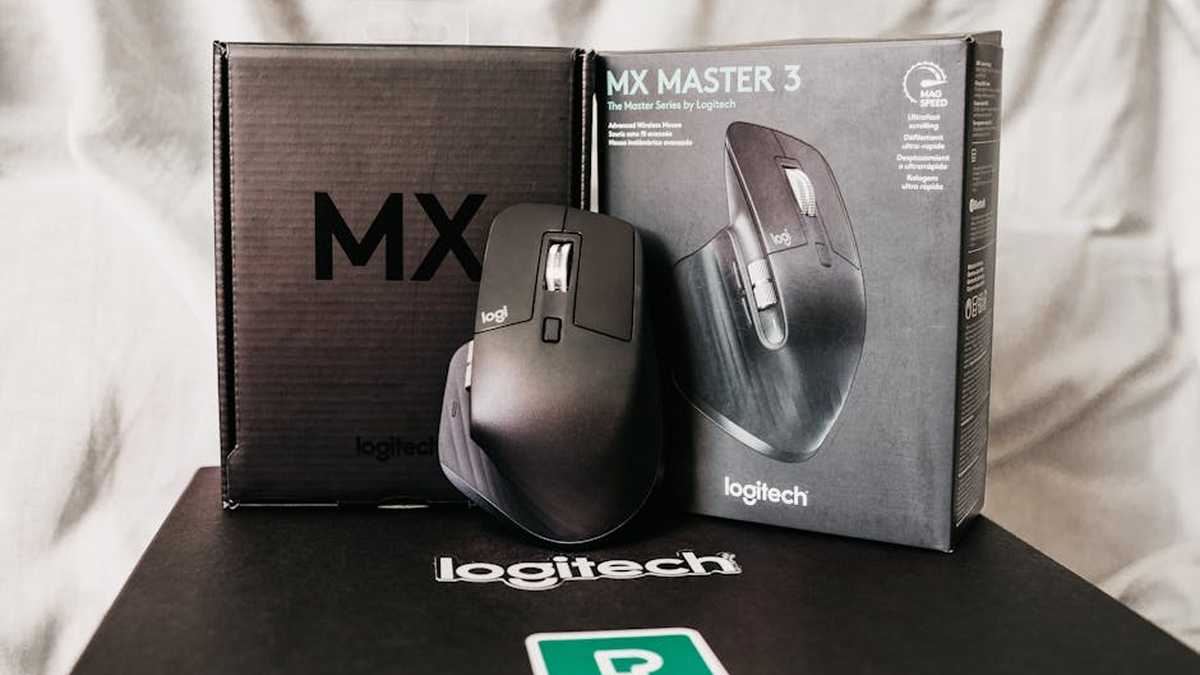
The Logitech MX Master 3S represents the pinnacle of Logitech’s traditional ergonomic mouse design, refined over generations. It’s a device crafted for power users, creative professionals, and anyone who demands precision, speed, and extensive customization. Its distinctive contoured shape perfectly cradles the hand, with a prominent thumb rest that provides ample support during long work sessions. The defining feature, beyond its comfortable grip, is the MagSpeed Electromagnetic scroll wheel, capable of zipping through 1,000 lines per second or switching to precise detent scrolling with a whisper-quiet operation. Coupled with a horizontal thumb scroll wheel and a gesture button, the MX Master 3S is a true productivity powerhouse, offering unparalleled control and efficiency across multiple applications and devices.
Logitech MX Vertical Overview: Redefining Hand Health
The Logitech MX Vertical takes a radical departure from conventional mouse design, prioritizing wrist and forearm health above all else. Its striking 57-degree vertical angle positions the hand in a natural “handshake” posture, which significantly reduces forearm pronation and wrist pressure. This design is specifically engineered to mitigate the risk of Repetitive Strain Injury (RSI) and alleviate discomfort for those already experiencing it. While its form factor requires an adjustment period, the MX Vertical aims to provide a stress-free computing experience. It foregoes some of the advanced productivity features of the Master series in favor of its core ergonomic mission, focusing on a comfortable, natural interaction that keeps the user’s arm and wrist in a healthier alignment. Related: Best Ergonomic Productivity Boosters for Hybrid Office Setups in USA (2026)
Feature Comparison: A Deeper Dive
Ergonomics and Comfort: Two Paths to Well-being
The core differentiator lies in their ergonomic philosophy. The MX Master 3S offers a well-established, comfortable, and supportive contour that fits the hand like a glove, ideal for users who prefer a more conventional grip but with superior support. Its large surface area distributes pressure effectively. In contrast, the MX Vertical’s 57-degree tilt is a direct intervention against forearm pronation, a common contributor to wrist and arm pain. This “handshake” grip aims to align the forearm in a more neutral position, making it a compelling choice for those actively seeking to improve their arm posture or alleviate existing discomfort. Users sensitive to wrist angles will find the MX Vertical’s approach revolutionary. Related: TempPerfect Smart Mug Warmer: Auto-Shutoff & 3 Heat Settings Review for USA Home Offices
Precision and Control: Productivity Enhanced
Both mice boast Logitech’s Darkfield/High Precision sensors, allowing tracking on virtually any surface, including glass. However, the MX Master 3S edges out with a higher DPI ceiling (8000 vs 4000), offering finer control for high-resolution monitors or precision-intensive tasks like graphic design. The MX Master 3S also shines with its dual scroll wheels: the MagSpeed main wheel for ultra-fast or precise scrolling, and a dedicated thumb wheel for horizontal navigation. This dual-axis scrolling capability is invaluable for spreadsheets, timelines, and creative applications. The MX Vertical offers a standard precision scroll wheel, perfectly adequate for general use but lacking the advanced versatility of its counterpart. Related: Best Ergonomic Monitor Stands to Prevent Neck Pain in USA (2026)
Customization and Software: Tailoring the Experience
Both mice leverage Logi Options+ software for customization, allowing users to remap buttons, adjust pointer speed, and create application-specific profiles. The MX Master 3S, with its greater number of programmable buttons (including a gesture button under the thumb rest), offers a broader canvas for macro assignments and shortcuts, making it a true extension of a power user’s workflow. Logitech Flow, a standout feature on the MX Master 3S, enables seamless cursor and file transfer across multiple computers, a significant boost for multi-system setups. While the MX Vertical supports multi-device switching, it doesn’t offer the advanced Flow functionality. Related: My Honest Rocketbook Core Review: The Last Notebook You’ll Ever Buy for WFH & Hybrid Office?
Battery Life and Connectivity: Reliability for the Long Haul
Both mice offer excellent battery life, with the MX Master 3S boasting up to 70 days and the MX Vertical an impressive 4 months. Both feature USB-C fast charging, providing hours of use from just a minute or two of charge, ensuring minimal downtime. Both utilize Logitech’s secure Logi Bolt receiver or Bluetooth Low Energy, offering robust and reliable wireless connections suitable for demanding office environments. Related: Best Compact Standing Desk Converters for Small Home Offices in USA (2026)
Pros and Cons: Weighing the Options
Logitech MX Master 3S
Pros:
- Exceptional Precision and Speed: 8000 DPI sensor and MagSpeed scrolling are top-tier for detailed work.
- Advanced Productivity Features: Horizontal scroll wheel, Flow multi-computer control, and gesture button enhance workflow significantly.
- Superior Customization: More programmable buttons and extensive software integration via Logi Options+.
- Premium Build Quality: Solid, durable feel with high-quality materials.
- Comfortable, Traditional Grip: Natural, hand-sculpted design with an excellent thumb rest.
Cons:
- Ergonomics for Some: While comfortable, it doesn’t actively address forearm pronation like vertical mice do, potentially less beneficial for severe wrist strain.
- Learning Curve for Advanced Features: Utilizing all its capabilities (Flow, gestures) takes time.
- Higher Price Point: Generally more expensive than the MX Vertical.
- Size: Might be too large for users with smaller hands.
Logitech MX Vertical
Pros:
- Revolutionary Ergonomics: 57-degree vertical tilt significantly reduces forearm pronation and wrist pressure.
- Alleviates and Prevents RSI: Excellent for users with existing wrist/arm pain or those proactively preventing it.
- Natural Handshake Grip: Feels natural once accustomed, promoting a healthier posture.
- Good Battery Life: Up to 4 months on a single charge.
- More Affordable: Generally a lower investment than the MX Master 3S.
Cons:
- Adjustment Period: The vertical design requires time to adapt, which can feel awkward initially.
- Fewer Productivity Features: Lacks the horizontal scroll wheel, gesture button, and Flow functionality of the Master series.
- Less Precision-Focused: Lower max DPI and a standard scroll wheel may not satisfy power users or graphic designers as much.
- Potential for Less Control: The grip, while ergonomic, can feel less precise for very fine movements compared to a traditional grip for some users.
Which One is Better For Whom?
Choose the Logitech MX Master 3S if you are:
- A Power User or Creative Professional: Who thrives on efficiency, precision, and extensive customization. If your work involves graphic design, video editing, data analysis, or complex spreadsheets, the Master 3S’s features will be invaluable.
- Managing Multiple Devices with Flow: If you frequently switch between two or three computers (e.g., a work laptop and a personal desktop), Flow will revolutionize your multi-tasking.
- Seeking a Highly Responsive and Precise Mouse: The 8000 DPI sensor and MagSpeed wheel offer unmatched control and speed.
- Comfortable with Traditional Ergonomics: You prefer a well-supported, hand-sculpted traditional mouse shape and do not have severe wrist pronation issues.
Choose the Logitech MX Vertical if you are:
- Experiencing Wrist or Forearm Pain: This is its primary purpose. If you suffer from RSI, carpal tunnel syndrome, or general discomfort from prolonged mouse use, the Vertical is designed to mitigate these issues.
- Proactively Preventing Ergonomic Issues: If you spend long hours at a computer and want to invest in a healthier future for your wrist and arm.
- Prioritizing a Natural Handshake Posture: You seek a mouse that places your hand and forearm in a neutral, less pronated position.
- A General Office Worker: Whose tasks involve standard navigation and clicking, and who values ergonomic health over advanced productivity features.
Final Verdict: Ergonomics Meets Productivity – A Personal Choice
The question of which mouse “reigns supreme” ultimately depends on your individual needs and priorities in the USA office environment this season. There is no single victor, as both mice excel in their distinct domains.
The Logitech MX Master 3S is the undisputed champion for productivity, precision, and advanced features. It’s for the user who demands utmost control, speed, and seamless multi-device functionality, thriving in a high-demand professional setting where every second counts and complex tasks are the norm. Its ergonomics are excellent for a traditional mouse, offering great support.
The Logitech MX Vertical, on the other hand, is the clear winner for dedicated ergonomic health and comfort. It’s the mouse to choose if preventing or alleviating wrist and forearm strain is your primary concern. While it might forgo some of the MX Master’s advanced bells and whistles, its unique design delivers tangible benefits for long-term well-being.
Consider your daily tasks, existing physical comfort, and willingness to adapt to a new form factor. For the ultimate blend of power and traditional comfort, the MX Master 3S is stellar. For a radical shift towards forearm and wrist health, the MX Vertical is unparalleled. Your “supreme” mouse is the one that best aligns with your personal intersection of productivity demands and ergonomic requirements.