





Introduction
In an era where desk space is often at a premium and portability is increasingly valued, the compact mechanical keyboard has carved out a significant niche. These smaller form factor keyboards deliver the tactile satisfaction and robust performance of their full-sized counterparts, but in a footprint that caters to minimalists, travelers, and gamers seeking more mouse room. This review delves into the MecKey Pro Compact, a keyboard designed to be a versatile workhorse for both intense gaming sessions and prolonged typing tasks, offering a compelling blend of features for the discerning user.
Product Overview: The MecKey Pro Compact
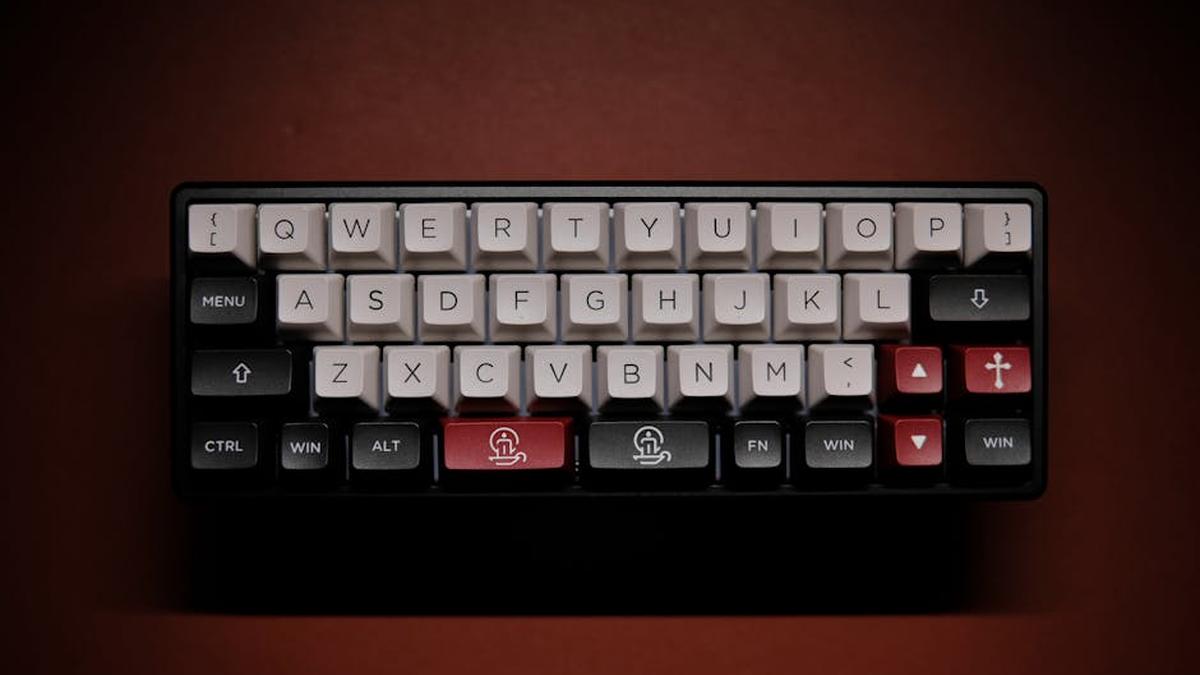
The MecKey Pro Compact positions itself as a premium 65% mechanical keyboard, striking an ideal balance between a minimalist design and essential functionality. Its 65% layout retains dedicated arrow keys and a few navigation keys (like Delete and Page Up/Down), which are often sacrificed in smaller 60% designs, making it significantly more practical for daily use without a steep learning curve. Constructed with a solid aluminum frame and high-quality PBT double-shot keycaps, it promises durability and a premium feel from the moment you unbox it. Underneath, hot-swappable switches (our review unit came with Gateron Brown equivalents) offer customization potential, allowing users to tailor the typing experience to their precise preference.
Key Features
- 65% Form Factor: Optimizes desk space while retaining crucial arrow keys and a select few navigation keys, enhancing usability over smaller 60% layouts.
- Hot-Swappable Switches: Equipped with 3-pin and 5-pin hot-swappable sockets, allowing users to easily swap out mechanical switches without soldering. Our unit features Gateron Brown equivalent switches, offering a satisfying tactile bump.
- Durable Construction: Features a sturdy anodized aluminum top plate and a high-quality ABS plastic base, contributing to its robust build and pleasant weight.
- PBT Double-Shot Keycaps: Resilient and textured PBT (polybutylene terephthalate) keycaps resist shine and wear over time, ensuring legends remain crisp and visible.
- Dynamic RGB Backlighting: Per-key RGB lighting with multiple customizable effects, brightness levels, and color options, manageable directly on the keyboard or via accompanying software.
- USB-C Connectivity: Detachable USB-C to USB-A cable provides a reliable, low-latency wired connection, enhancing portability and cable management.
- Programmable Software: Dedicated software enables comprehensive key remapping, macro creation, and advanced RGB customization, saving profiles for different uses.
Pros and Cons
Pros:
- Space-Saving Design: Significantly frees up desk space, allowing for greater mouse movement, which is beneficial for gamers.
- Premium Typing Experience: Mechanical switches provide superior tactile feedback and responsiveness compared to membrane keyboards.
- High Durability: Robust construction materials and PBT keycaps ensure a long lifespan, even with heavy daily use.
- Customization Potential: Hot-swappable switches and programmable RGB lighting offer extensive personalization options.
- Portability: Its compact size and detachable cable make it easy to transport for work, travel, or gaming on the go.
- Versatile Use: Excellent for both rapid-fire gaming and comfortable, long-duration typing tasks.
Cons:
- Learning Curve: Users accustomed to full-size keyboards may need time to adjust to the condensed layout and reliance on function layers for missing keys (e.g., F-row, Print Screen).
- No Dedicated Numpad: Absence of a numpad might hinder users involved in frequent data entry.
- Wired Only: Lacks wireless connectivity options (Bluetooth/2.4GHz), which some users might prefer for ultimate desk cleanliness.
- Price Point: Positioned in the mid-to-high range for mechanical keyboards, potentially higher than budget-focused alternatives.
- No Included Wrist Rest: While common for compact boards, a dedicated wrist rest is not included, which might be a concern for some users over long sessions.
Who Should Buy This
- Gamers with Limited Desk Space: The reduced footprint provides ample room for expansive mouse movements, a critical advantage in competitive gaming.
- Productivity Enthusiasts: Typists who value the tactile feedback of mechanical switches and want a compact, yet functional, keyboard for everyday work.
- Minimalist Desk Setup Adherents: Those aiming for a clean, uncluttered workspace will appreciate its sleek and compact design.
- Travelers and Commuters: Its portability and robust build make it an excellent companion for those who need to carry their keyboard between locations.
- Customization Seekers: Users interested in experimenting with different switch types or customizing RGB lighting to match their aesthetic.
Who Should Avoid This
- Numpad-Reliant Professionals: Accountants, data entry specialists, or anyone who heavily relies on a dedicated numerical keypad will find its absence disruptive.
- Beginners to Mechanical Keyboards: Individuals new to mechanical keyboards who prefer a full-size layout with all keys readily accessible without function layers.
- Strictly Budget-Conscious Buyers: While offering excellent value, its price point may be higher than very entry-level mechanical or membrane keyboards.
- Wireless-Only Enthusiasts: Users who prioritize a completely wire-free desk setup will need to look for a different model with Bluetooth or 2.4GHz connectivity.
Pricing Insight
The MecKey Pro Compact typically retails in the range of $90 to $130, depending on the retailer and any ongoing promotions. This pricing places it firmly in the mid-range for quality mechanical keyboards, reflecting its premium build materials (aluminum plate, PBT keycaps), hot-swappable switch sockets, and comprehensive RGB lighting. While certainly a greater investment than a standard membrane keyboard, the MecKey Pro Compact offers substantial value through its durability, customization potential, and superior typing/gaming experience. For those seeking a long-term peripheral that performs reliably and feels great to use, this price point represents a worthwhile expenditure. Keep an eye out for seasonal sales events, as these can occasionally offer a beneficial reduction on this model.
Related: Elgato Stream Deck MK.2 Review: Your Essential Companion for Stream Production in 2024
Comparison with 1 Alternative: Standard Mech TKL Keyboard
To put the MecKey Pro Compact’s design into perspective, let’s consider a common alternative: a standard Tenkeyless (TKL) mechanical keyboard, often represented by popular models like the "Apex TKL Mechanical Keyboard" from a well-known gaming brand.
Related: Shure SM7B vs Rode NT1: Professional Streaming Microphone Battle for US Podcasters & Gamers
| Feature | MecKey Pro Compact (65%) | Apex TKL Mechanical Keyboard (TKL) |
|---|---|---|
| Form Factor | 65% (compact, includes arrow keys) | Tenkeyless (TKL) (no numpad, full F-row, dedicated nav cluster) |
| Footprint | Significantly smaller, maximizes desk space | Moderately smaller than full-size, still takes up notable space |
| Key Layout | Condensed, relies on function layer for F-row, Print Screen, etc. | Standard, dedicated F-row, full navigation cluster (Ins, Del, Home, End, PgUp, PgDn) |
| Portability | Excellent, very easy to carry | Good, but less compact than 65% |
| Switch Customization | Hot-swappable (easy to change switches) | Typically soldered (switches are fixed) |
| Target User | Minimalists, gamers seeking maximum mouse room, travelers | Gamers and typists who want a compact board but minimal compromise on key layout (excluding numpad) |
| Connectivity | Wired USB-C | Often wired USB-A (some TKLs offer wireless variants) |
The key difference lies in the trade-off between size and functionality. The MecKey Pro Compact excels in minimalism and portability, demanding a slight adjustment to its condensed layout. The Apex TKL, on the other hand, offers a more traditional typing experience, retaining a full F-row and a dedicated navigation cluster, making it a step closer to a full-size board without the numpad. For users who cannot compromise on dedicated F-keys or specific navigation keys, a TKL might be the better choice, even if it occupies slightly more desk space. However, for those who truly value every inch of desk space and the ability to customize their switches easily, the MecKey Pro Compact stands out.
Related: PlayStation 5 vs Xbox Series X: Which Next-Gen Gaming Console Wins for USA Buyers in 2024?
Final Verdict
The MecKey Pro Compact emerges as a highly commendable choice for anyone seeking a high-performance mechanical keyboard that doesn’t dominate their desk. Its 65% layout hits a sweet spot, providing more functionality than a 60% board without the bulk of a TKL or full-size. The robust aluminum frame, durable PBT keycaps, and hot-swappable switches speak to its quality and long-term viability. Whether you are a competitive gamer who needs maximum mouse real estate, a typist who appreciates satisfying tactile feedback, or a digital nomad requiring a portable yet powerful input device, the MecKey Pro Compact delivers a compelling package. While it requires a minor adaptation for those unfamiliar with compact layouts, the benefits in terms of aesthetics, performance, and desk efficiency make it a worthy investment. This keyboard confidently earns its place as an excellent everyday companion for productive gaming and typing.
Related: Lightweight Gaming Mouse Review: The Daily Precision Tool for Fast-Paced PC Action
Related: SteelSeries Apex Pro TKL Wireless (2023) Review: Best OmniPoint Keyboard for Fast-Paced Gaming?
How does the compact design impact typing comfort and speed for extended work or writing sessions?
The compact design of this mechanical keyboard is surprisingly beneficial for typing productivity. By eliminating the numpad and sometimes extraneous keys, it allows for a more ergonomic posture, reducing shoulder strain as your mouse hand is closer to your keyboard. While it might take a short adjustment period to get used to any function layer shortcuts for missing keys, the high-quality mechanical switches (like tactile browns or clicky blues) provide excellent feedback, which often leads to increased typing accuracy and a more enjoyable experience over long periods. Many users report no significant decrease in speed, and some even find their efficiency improves due to the more focused layout.
Despite its compact size, how well does this keyboard perform in fast-paced gaming scenarios?
This compact mechanical keyboard is remarkably well-suited for competitive and fast-paced gaming. The core advantage of its size is freeing up valuable desk space, allowing for wider, unrestricted mouse movements critical in FPS and other action-heavy games. Coupled with responsive mechanical switches (often linear reds or speed switches) that offer low actuation force and rapid response times, you won’t miss a beat. Features like N-key rollover and anti-ghosting ensure every keypress registers accurately, even during intense button mashing. The robust build quality also means it can withstand aggressive gaming sessions.
What is the overall build quality like, and can this keyboard withstand daily, rigorous use for both gaming and professional work?
The keyboard is designed with durability in mind, making it an excellent “everyday choice.” It typically features a sturdy base made from high-quality plastic or even aluminum, which prevents flex and provides a solid typing platform. The keycaps are often double-shot PBT, known for their resistance to shine and wear over time, ensuring legends remain crisp. The mechanical switches themselves are rated for tens of millions of keystrokes, promising long-term reliability. A braided, detachable USB-C cable is also a common feature, adding to its longevity and portability, making it perfectly capable of withstanding the rigors of both demanding gaming and daily office tasks.
What mechanical switch options are available, and how easy is it to customize the keyboard with different keycaps or switches later on?
This compact mechanical keyboard usually comes with a variety of popular switch options to cater to different preferences, such as linear (e.g., Gateron Red, Cherry MX Red) for smooth gaming and quiet typing, tactile (e.g., Gateron Brown, Cherry MX Brown) for a balanced typing and gaming experience with a noticeable bump, or clicky (e.g., Gateron Blue, Cherry MX Blue) for a more pronounced auditory and tactile feedback. Customization is often a key selling point; most models feature a standard keycap layout, making it easy to swap out keycaps with aftermarket sets. Many versions are also “hot-swappable,” allowing you to change the mechanical switches themselves without soldering, offering unparalleled flexibility to fine-tune your typing and gaming experience over time.
Related Products
- Lightweight Gaming Mouse Review: The Daily Precision Tool for Fast-Paced PC Action
- Wireless Gaming Headset Review: Your Daily Go-To for Immersive Audio & Crystal Clear Comms
- Best Wi-Fi 6E Gaming Routers for Low Latency in USA (2026)
- Best Ergonomic Gaming Chairs Under $500 in USA (2026)
- Best 1440p Gaming Monitors for PS5 & Xbox Series X in USA (2026)



